How to Start Banking with World App

If you don’t know where to get started, getting your money onchain can still be quite complicated compared to traditional rails. But this gap is closing fast.
More and more crypto-neobanks, or simply crypto apps with banking features, are hitting the market, with World App being the latest one.
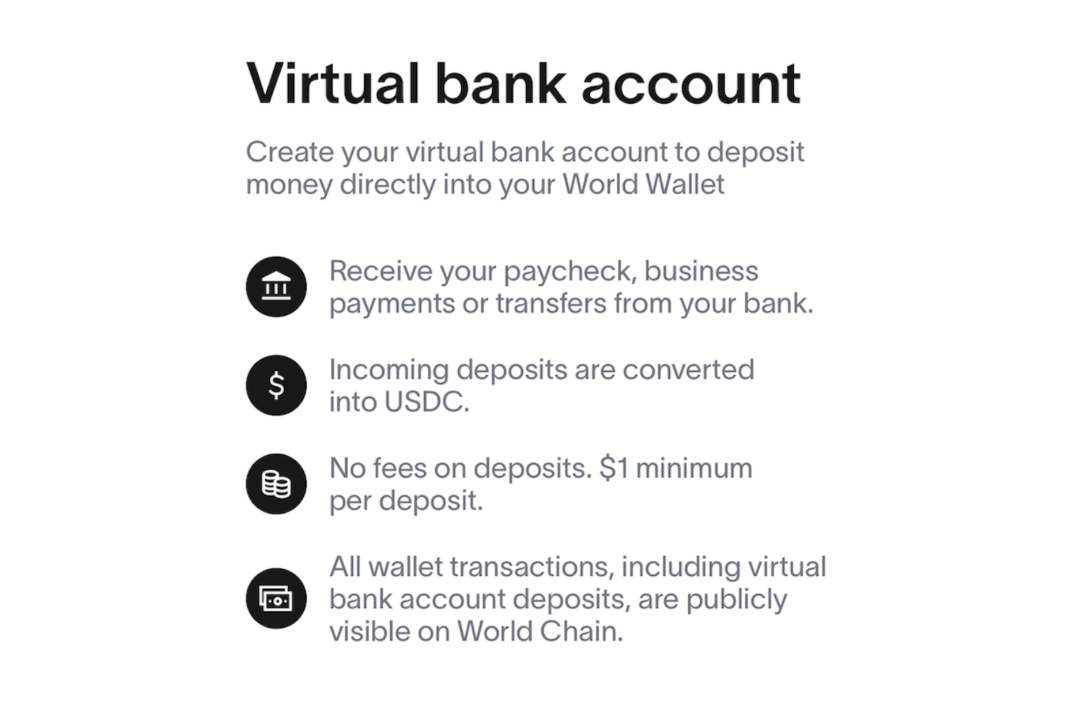
Last week, the World mobile app — the front-end and social hub for World Chain — rolled out virtual bank accounts, giving every user a real account number and standard banking features like direct deposit, all of which can flow straight into crypto. Your employer can pay you. Businesses can pay you. You can transfer from your own bank. All through standard banking rails that everyone already understands.
The money converts to USDC automatically and lands onchain. No exchanges, no bridges, no complexity. Just deposits that work like normal banking but end up as stablecoins in your wallet.
The pilot is live in the U.S. now, with global expansion coming later. Let me walk you through how to get started.
Virtual bank accounts are here! Set up recurring transfers to World App with a paycheck and seamlessly convert USD to @USDC. Or schedule a one-time transfer with as little as $1 and no fees. pic.twitter.com/O3Fxho2sdP
— World App (@useworldapp) November 20, 2025
Setting Up Your Account
Creating your Virtual Bank Account takes only a few minutes. Here's the walkthrough:
- Start the Setup — Open World App and go to the center Wallet tab. Find Bank account. It'll show "Set Up" if you haven't created one yet.
- Create Your Account — Tap Create virtual account.
- 'Pick' Your Currency — Select your currency by tapping Add. Currently, USD is the only option so don’t be confused if that’s all you see.
- Verify Your Identity — Choose a verification method and tap Continue. You'll go through KYC with Lead Bank (World's partner bank). It's standard identity verification — nothing unusual.
Once verified, your Virtual Bank Account will immediately be created. Tap Account details to see your account number, routing number, and bank info. Share the details with your employer, start receiving payments, or fund it from your own bank.
What to Remember
- Each account is unique to you and your World Wallet
- You can create multiple accounts
- Everything deposited converts to USDC automatically
Getting Money Into Your Account
Once your account exists, the process for receiving money is straightforward.
- Go to Your Account — Open the Wallet tab and select Bank account. If you’ve made multiple, choose the one you want to use and tap Details.
- Get Your Account Info — Tap Account details. You'll see your routing number, account number, and bank name.
- Share the Details — Give these to whoever's paying you – your employer, a client, or yourself if you're transferring from your own bank. You can tap Share all details to send everything via email or messaging.
- Wait for the Notification — You'll get an app notification when funds arrive and convert to USDC.
Important Notes
ACH transfers typically take 1-3 business days while wires process within hours. If you're sending money from your own bank account, the name on your bank account must match your Virtual Bank Account name — this is a security requirement you can't bypass. The minimum transaction is $1. If you run into problems with deposits, follow the steps in World’s guide here to resolve the issue.
 David Christopher Oct 28, 2025 • 8 min read
Closing Thoughts
Recently I wrote about the rise of crypto-native neobanks, a trend which World’s release fits neatly in.
And, since blockchains make it so easy to offer banking functionality — deposits, transfers, stablecoin accounts — I expect more apps, particularly “social” or “dashboard” apps, to follow this pattern too. We’ve seen Farcaster focusing more and more on integrating financial features, with their recent(ish) deposits campaign hinting at more than just a move to stimulate trading. Phantom has also evolved from a wallet to a social network and now (essentially) a bank account.
 Bankless Sep 30, 2025 • 1 min read
The vision all these apps are driving to becomes clearer by the day, a unified hub for your money, accepted by traditional systems and augmented by onchain ones. Many may miss the mark but, at the end of the day, it’s hard not to believe one will succeed in demonstrating crypto’s potential to the masses.