Sending Money Privately on Ethereum with Hinkal

The current privacy renaissance we're seeing in crypto is one of the best things to ever happen onchain. It's one of the final missing pieces for offering true DIY sovereignty onchain.
From a UX perspective, though, a slight friction point is that you have to migrate into most of the privacy systems available right now, whether that's bridging funds to a new chain or making deposits to shielded or stealth addresses.
In today's environment where regular transactions are transparent by default, the solutions that are already available are bona fide godsends, and it's also clear that new innovations will keep pushing privacy UX forward.
For instance, consider Hinkal. When I wrote about this privacy wallet last November, I covered the basics of how to try its dual-account wallet system, which gives users a bespoke public and shielded wallet pair.
 William M. Peaster Nov 21, 2025 • 4 min read
However, for many people, and particularly for crypto novices, it'd be ideal to be able to enjoy privacy features on their existing public wallets, so that it's not necessary to split funds to conceal activity.
Fortunately for us, Hinkal just introduced a Private Send feature precisely for that purpose.
How Private Send works
Private Send acts as a confidential routing layer:
- When you start a Private Send, your funds are routed through Hinkal’s smart contract before being delivered to a normal public address.
- From the outside, the transfer looks like it originated from the contract, not your wallet, which breaks any direct wallet-to-wallet trail.
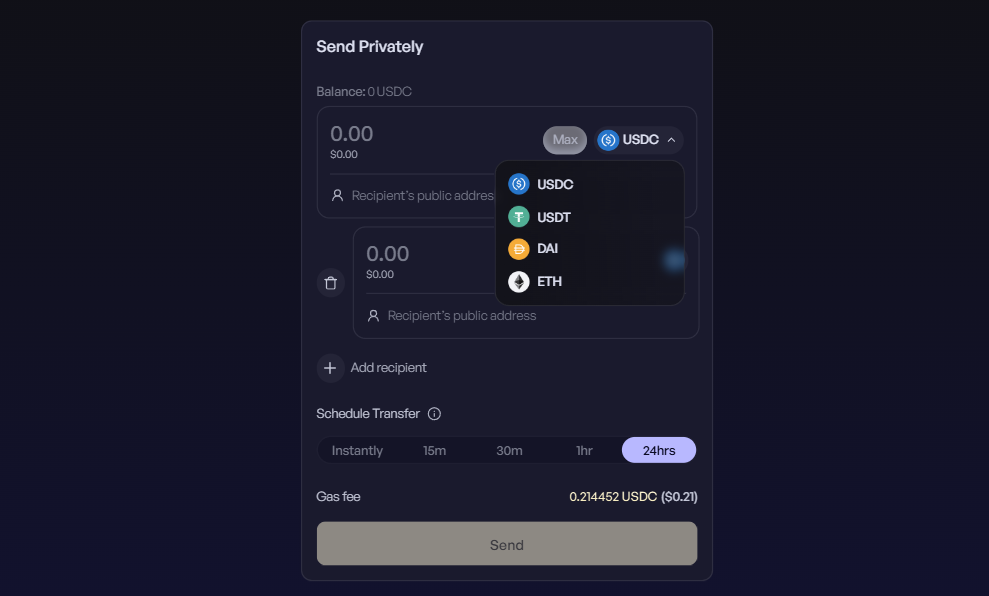
- Crucially, this all feels like a standard send from the user’s point of view, except you have some bonus features here, like the ability to split payments across multiple recipients or to set a specific transaction execution window for randomizing a send's timing.
Together, these features make it far harder for third parties to reconstruct transaction histories, and you can enjoy the utility here without having to activate new wallets or move funds from your main wallet.
How to try it for yourself
Hinkal Private Send supports ETH, DAI, USDC, and USDT transactions on Ethereum, Arbitrum, Base, Optimism, and Polygon. If you have any of these coins on any of these chains, you can try a Private Send like so:
- Head to send.hinkal.io and connect your wallet as you normally would.
- Select the chain you wish to send from using the chain tab on the upper right side of the page.
- Then in the main transfer UI, select the currency you wish to use and input your desired recipient address or addresses.
- Finish up by scheduling your transaction. You can choose "Instantly" or randomized sends during a 15-minute, 30-minute, 1-hour, or 24-hour window.
- Lastly, press the "Send" button and confirm the transaction with your wallet. The transaction will then execute according to your designated schedule.
When I explored the app, the gas fee for making a Private Send was ~$0.13. If nothing else, the solution is an affordable opt-in privacy option for people that prefer to stick to their main wallets, so consider adding it to your magic internet toolbox!