Getting Started with Hyperdash's Revamped Trading Terminal

With Lighter’s TGE out of the way, Hyperliquid has regained its lead in onchain perps volume and other key metrics. Despite that success, its native trading interface remains barebones: functional, but lacking the advanced analytics and intelligence tools professional traders tend to expect.
A number of different terminals have popped up to solve that, but they've largely managed to just make things more cluttered rather than adding a user edge. There’s a newly revamped contender though, which, upon initial impressions, actually seems to improve the trading experience with custom analytics, while keeping the interface and UX relatively simple.
After months of rebuilding following its acquisition by PVP Trade, Hyperdash relaunched this week with a clear pitch: give perps traders real edge through institutional-grade analytics and execution tools. The timing proves strategic — Hyperdash will serve as the exclusive trading terminal for Markets, Kinetiq's upcoming HIP-3 marketplace, which launches Monday and enables crowdfunded, permissionless perps markets.
Here’s how to get started using Hyperdash and navigating around its standout features.
The wait is over.
— pvp.trade (@pvp_dot_trade) January 5, 2026
Our desktop terminal, Hyperdash, is now fully available, enabling everyone to trade like the 1%.
Track, analyze, and mirror the most profitable traders with customizable features and advanced order types.
Gain detailed insights on markets, user trends,… pic.twitter.com/0clh5hot2p
Getting Started
First, head to Hyperdash’s website and create an account using Google, email, or by connecting your wallet directly.
Once registered, you can deposit via credit or debit card, or transfer crypto from 11 chains — Polygon, Ethereum, Solana, BSC, Base, Arbitrum, Optimism, HyperEVM, Abstract, Ethereal, and Bitcoin — across 20+ supported tokens.
Know that there are minimum deposits — $3 for most chains ($10 for Ethereum and Bitcoin).
Select your token and chain, scan the QR code or copy the deposit address, and funds appear almost instantly.
The Trade Interface
Now that you’re funded, next comes trading.
The main trading view centers on a TradingView-powered chart with customizable timeframes and indicators. To the right sits the order book displaying bid/ask depth and the order panel where you can execute market or limit orders with adjustable leverage.
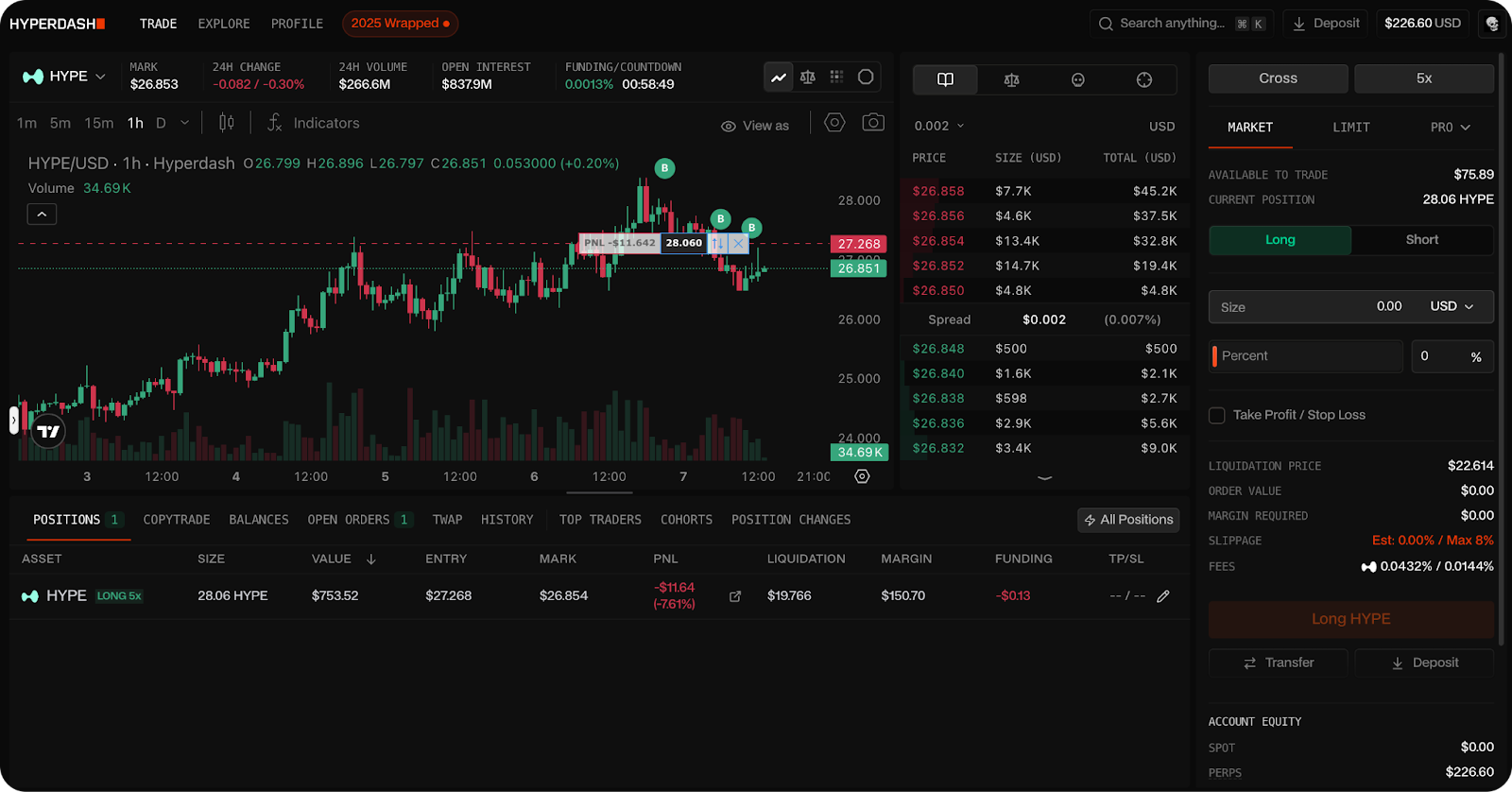
Beyond standard orders, Hyperdash offers advanced order types: Chase Orders that dynamically pursue the best available price, Trailing Stops to lock in profits as prices move, and private TWAP execution to minimize market impact on larger positions.
Below the chart, a row of tabs unlocks deeper functionality: Positions, CopyTrade, Balances, Open Orders, TWAP, History, Top Traders, Cohorts, and Position Changes.
Out of these, I’ve been using the Cohorts tab the most... Here, you’ll see positioning data for whatever asset you have selected, broken down by trader profitability.
For example, viewing ZEC might show all traders split 50/50 long and short — but that the "Extremely Profitable" cohort (+$1M PNL) specifically is 66% short, to the tune of $169M. The tab displays notional exposure (the amount you’re leveraged for rather than the amount of collateral you deposited), trader counts, and unrealized PNL distribution for each tier.
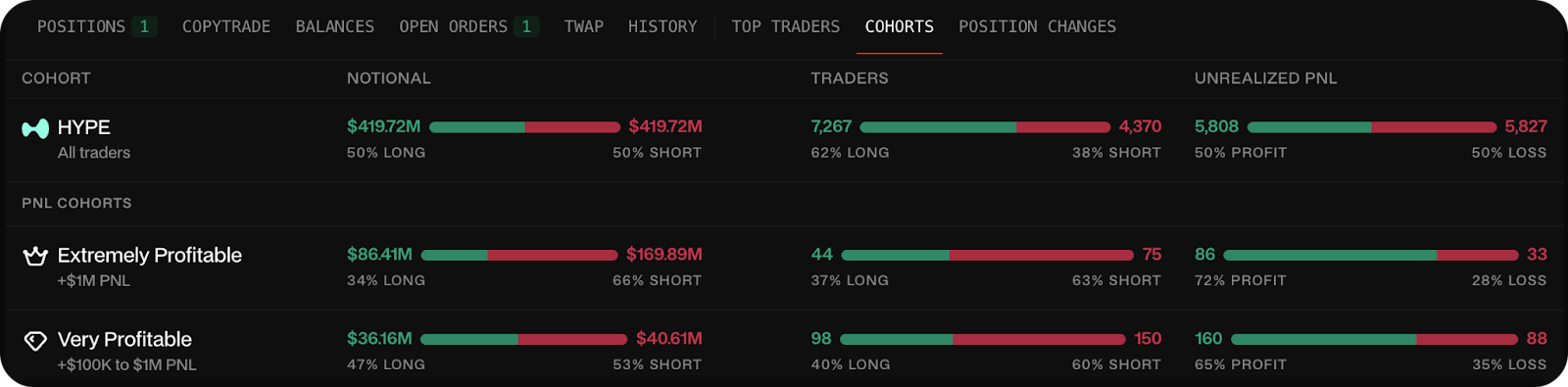
Before taking a position, checking how different cohorts are leaning on that specific asset can inform your conviction — though, at the end of the day, it usually feels best to trust your gut, regardless of the outcome. NFA!
Explore (Analytics)
Next we have the Explore tab for Hyperdash's trader discovery and onchain intelligence.
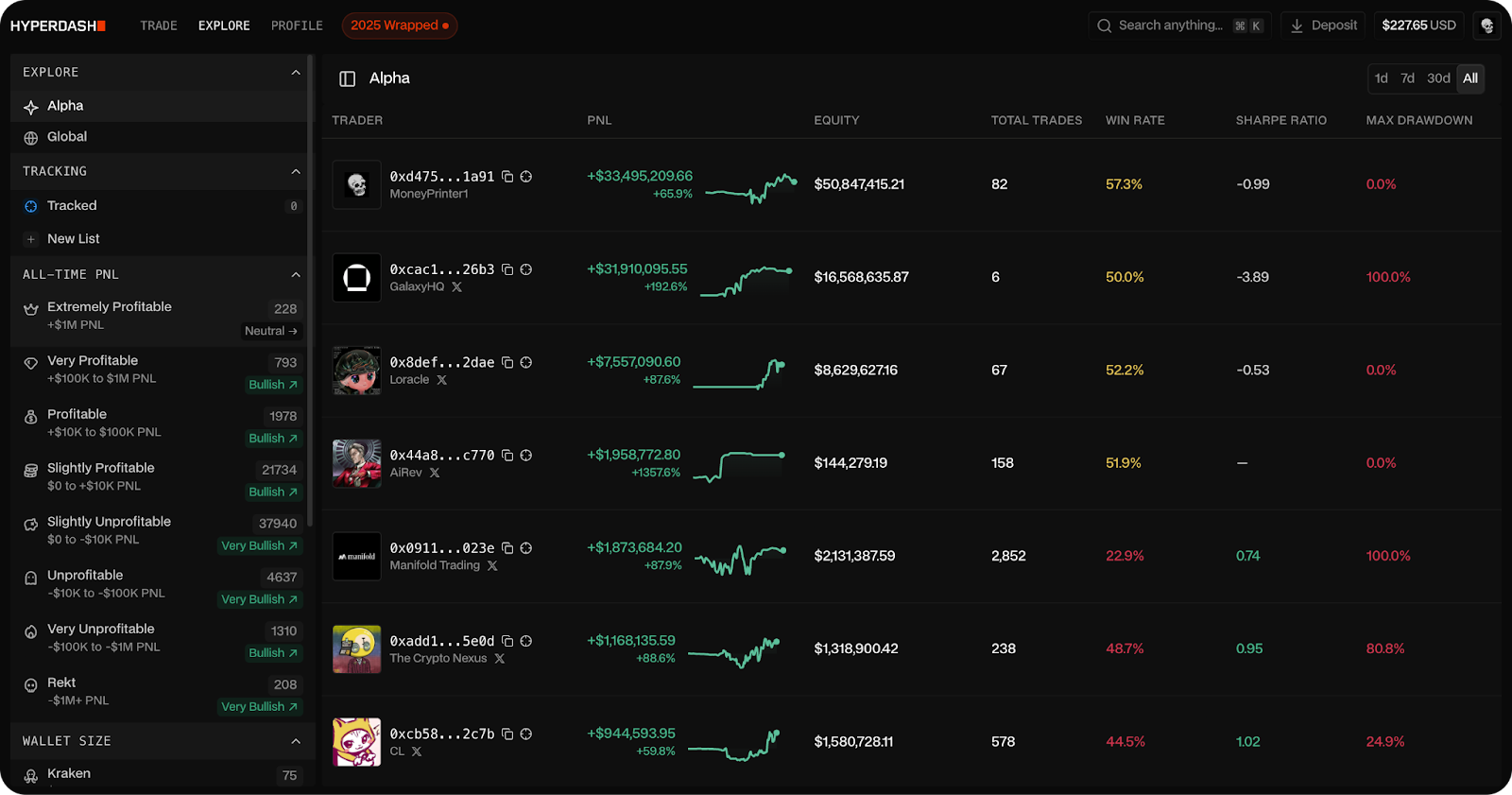
The Alpha leaderboard surfaces top-performing traders (you may recognize a few) ranked by PNL, equity, win rate, total trades, Sharpe ratio — a score detailing how much return you’re getting for your amount of risk — and maximum drawdown. A left sidebar lets you filter by profitability tiers — from "Extremely Profitable" (+$1M PNL) down through "Very Profitable," "Profitable," and so on to "Rekt" (-$1M+ PNL). You can also filter by wallet size.
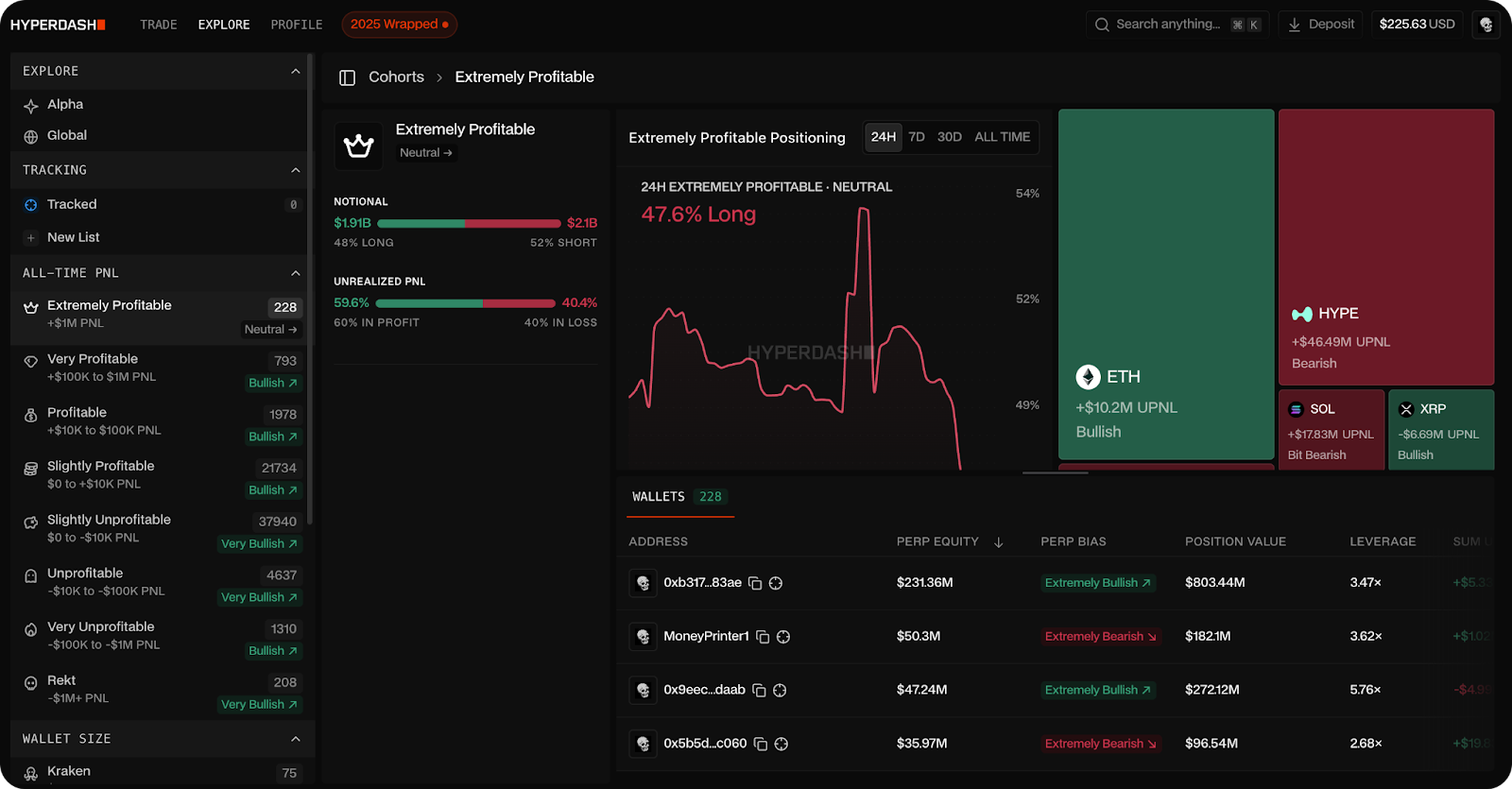
These are the cohorts which are displayed in the Cohorts tab in the actual trading interface.
In Cohorts, you can click into any trader to see their performance curve, current positions, and overall sentiment. From here, you can add wallets to a tracking list, counter their positions, or set up copy trading to mirror their moves.
Copy trading includes built-in risk controls for position sizing, stop-losses, and take-profits — configure it once and the system executes automatically based on your selected trader's actions.
I’m personally against copy trading given how hands-off it is, but the tracking is certainly a good tool to gauge movement.
Profile
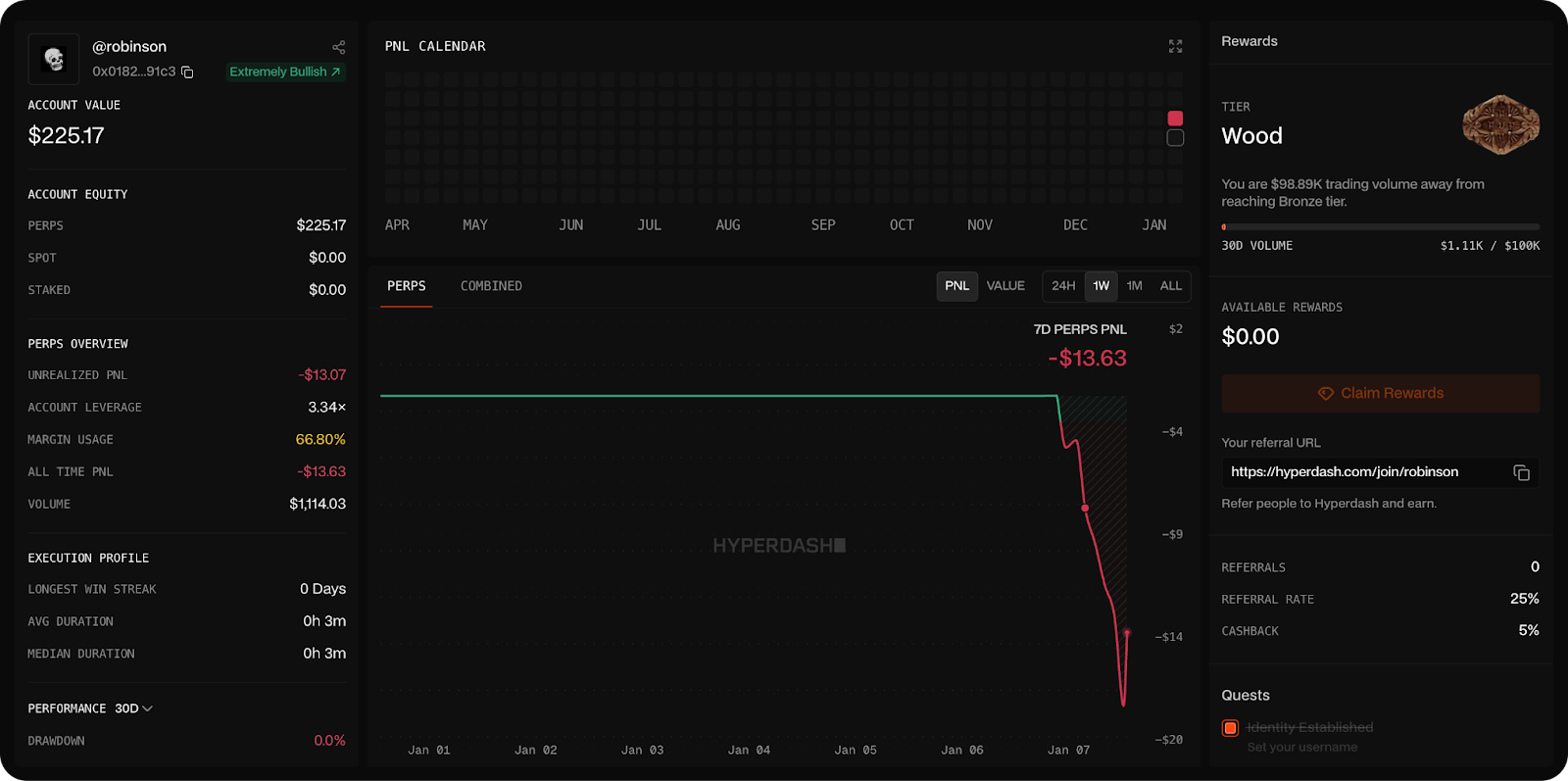
Lastly, we have the Profile tab that tracks your own trading performance.
You'll find your account value, a PNL calendar visualizing daily gains and losses, perps overview with unrealized PNL, leverage, and margin usage, plus an execution profile showing win streaks and average trade duration.
Hyperdash also looks to be running a tiered rewards system — new accounts start at "Wood" tier, with progression tied to trading volume. The first milestone requires $100K in 30-day volume to reach Bronze. As you climb tiers, you unlock cashback rewards on fees, while the platform’s referral program also lets you earn by bringing in other traders.
Wrapping Up
With Hyperliquid's ecosystem constantly expanding via new HIP-3 markets — oil most recently — having a proper trading terminal matters if it’s a serious venture for you.
Though I’ve only had a few days of experience with it, Hyperdash appears to be a pretty compelling venue — combining analytics, execution tools, and, most importantly, straightforward design, with the deep liquidity that keeps Hyperliquid dominant.
For those looking to trade Kinetiq's Markets launch or wanting better visibility into how profitable traders are positioned, Hyperdash provides the infrastructure to compete.